Skip to content
0
  • Recent
  • Tags
  • Popular
  • Search
  • ads.txt
  • Recent
  • Tags
  • Popular
  • Search
  • ads.txt
Collapse
Lime-it.us
rickR

rick

@rick
administrators
About
Posts
94
Topics
71
Shares
0
Groups
1
Followers
1
Following
1

Posts

Recent Best Controversial

  • Find system manufacturer
    rickR rick

    dmidecode

    Type   Information
         --------------------------------------------
            0   BIOS
            1   System
            2   Baseboard
            3   Chassis
            4   Processor
            5   Memory Controller
            6   Memory Module
            7   Cache
            8   Port Connector
            9   System Slots
           10   On Board Devices
           11   OEM Strings
           12   System Configuration Options
           13   BIOS Language
           14   Group Associations
           15   System Event Log
           16   Physical Memory Array
           17   Memory Device
           18   32-bit Memory Error
           19   Memory Array Mapped Address
           20   Memory Device Mapped Address
           21   Built-in Pointing Device
           22   Portable Battery
           23   System Reset
           24   Hardware Security
           25   System Power Controls
           26   Voltage Probe
           27   Cooling Device
           28   Temperature Probe
           29   Electrical Current Probe
           30   Out-of-band Remote Access31   Boot Integrity Services
           32   System Boot
           33   64-bit Memory Error
           34   Management Device
           35   Management Device Component
           36   Management Device Threshold Data
           37   Memory Channel
           38   IPMI Device
           39   Power Supply
           40   Additional Information
           41   Onboard Devices Extended Information
           42   Management Controller Host Interface
    
     Keyword     Types
           ------------------------------
           bios        0, 13
           system      1, 12, 15, 23, 32
           baseboard   2, 10, 41
           chassis     3
           processor   4
           memory      5, 6, 16, 17
           cache       7
           connector   8
           slot        9
    
    Linux Systems Guides system info dmidecode nix

  • Create database & user grant permissions
    rickR rick

    Maria database

    sudo su
    mariadb
    CREATE DATABASE <put your database name here without the carrots>;
    CREATE USER <put your password here without the carrots>@localhost IDENTIFIED BY 'put your password here';
    GRANT ALL ON your database name.* TO your_username@localhost;
    FLUSH PRIVILEGES;
    exit;
    exit
    
    Linux Systems Guides permissions mariadb grant user mysql create database

  • Ubiquity AP-Pro LED replacement
    rickR rick

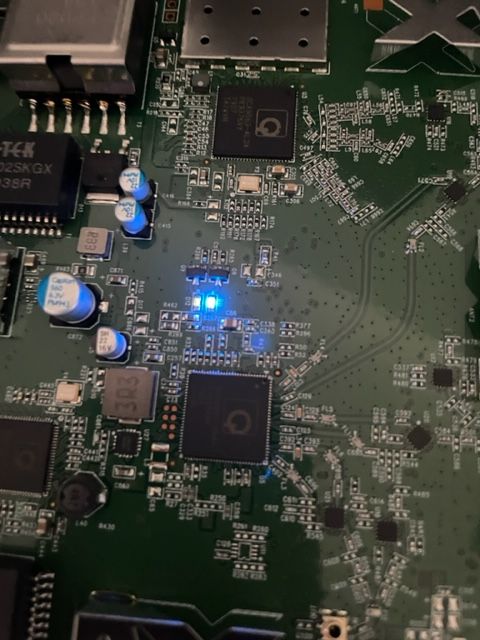
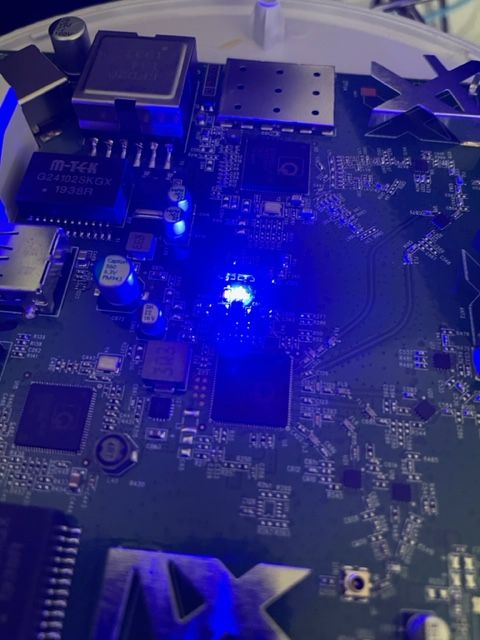
    After a couple years the blue LED in the AP-Pro’s withered to a mere shadow, not that this really matters for functionality, but it does. It’s a status report.

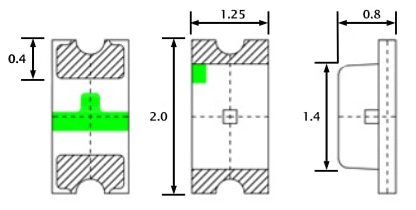
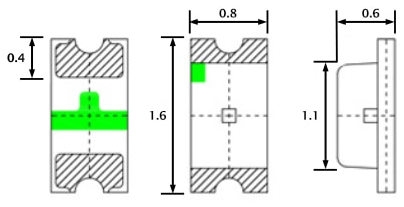
    Anyway I searched around to find the next size up from the 0603 which appear to be the original size, both the 0805 and the 0603 rates ~3v@ 20Ma. I opted to use the larger of the two. The size of the 0805 claims 2/1.25/.8 mm, where the 0603 sits 1.6/.8/.6

    led-0805.png led-0603.png

    For reference here is the 0805 in my hand , and on a Lowe’s gift card. The Anode (+) is the green mark.

    image3.png image2.jpeg

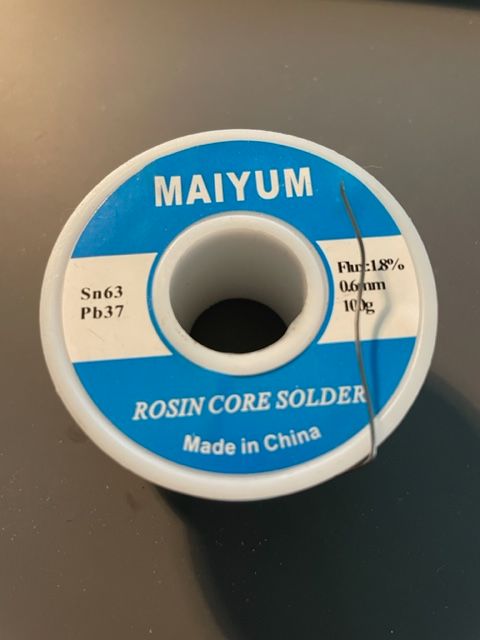
    The job could have used a solder tip 1/4 of the smallest size I had which was ~1.5mm, as well the solder could have been 0.3mm Vs. 0.6mm

    IMG_8745.jpg

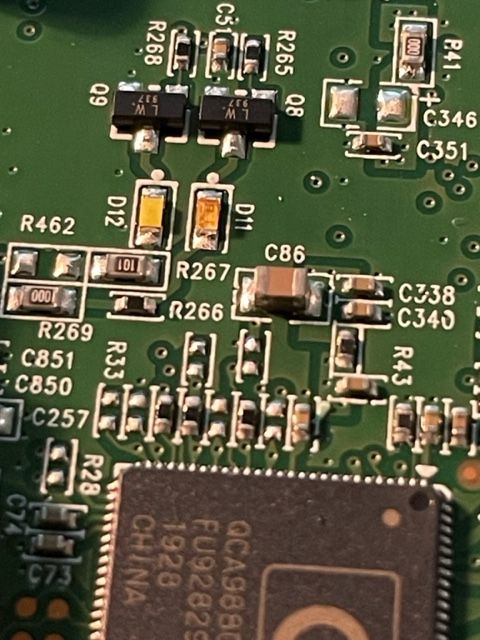
    The blue LED is located at ‘D11’, the white is ‘D12’

    image8.jpeg

    Below is the before and after replacement of the LED’s The new LED floods the lens.

    IMG_8738.jpg image7.jpeg

    At any rate, it was more difficult to spudge the cases open than the LED’s were to replace. There is a small amount of silicone type compund around the rim, and three interlocking standoffs on the case. Snapped back together as if they were happy.

    Before / after

    image5.jpeg image4.jpeg

    This whole thing started after running a CT of Unifi for the controller. They use a version of MariaDB that is no longer maintained, therefore the base OS cannot be updated without hacking together a system. There is a shell script someone came up with that Ubiquity is linking to, I was not entertained. Considering I’ve used the container to manage the AP’s for a while I was ready to update some hardware.

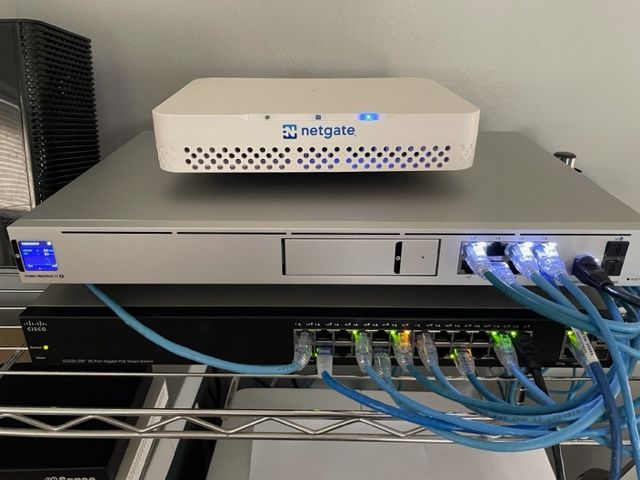
    The UDM-SE wants to live in front of everything else, considering I’m a PfSense user, that was not going to happen. I gave it it’s own physical LAN port on the Netgate 4100 in it’s own VLAN, chose to set the DHCP to relay, nothing I’ve done so far allows the IP’s the DHCP server in PfSense lease to the AP clients, to pass data through the UDM. Spanning tree refused to allow me entry to the UDM when setup this way. Turning off RSTP allowed access to UDM (but only by a direct physical connection to the UDM.) likely due to the subnet difference, Loving level2.

    I’ll need to segregate and run a PCAP while a client.

    So for now the UDM sits on the side in it’s own VLAN corner, serving IP’s to clients in it’s own subnet. The double NAT doesn’t seem to effect throughput by any noticeable difference.

    IMG_8744.jpg

    I posted this over at TestMy.net if you have any questions or comments.

    Linux Systems Guides ubiquity unify ap-pro udm-se pfsense led

  • Connect NFS Ubuntu TrueNas
    rickR rick

    Mount NFS from Truenas

    mkdir -p /media/rick/pool1
    
    chown -R rick:rick  /media/rick/pool1
    

    Add the automount to: /etc/fstab

    truenas.thecave:/mnt/pool1   /media/rick/pool1   nfs    user,auto    0   0
    

    Retstart Nautilus to see the share in files:

    killall nautilus
    

    For other shares, just repeat the same process under directory ‘media’ with the name of the share substituted

    Linux Systems Guides truenas fstab nfs linux ubuntu

  • ISO from DVD to local file
    rickR rick

    FYI for FreeBSD the driver only supports block size chunks, therefore:

    dd if=/dev/cd0 of=/name-the.iso bs=2048
    
    Linux Systems Guides copy windows command line iso vm dd

  • List IP acessing nginx
    rickR rick

    sort -g /var/log/nginx/access.log | awk '{print $1}' | uniq

    Linux Systems Guides nginx ip command line access

  • Format USB FreeBSD gpart
    rickR rick

    Locate devices:

    camcontrol devlist
    

    Output; in this case only:

    <ST3500418AS CC35>                 at scbus3 target 0 lun 0 (pass0,ada0)
    <ST500DM002-1BD142 KC45>           at scbus5 target 0 lun 0 (pass1,ada1)
    <AHCI SGPIO Enclosure 1.00 0001>   at scbus9 target 0 lun 0 (ses0,pass2)
    <Generic STORAGE DEVICE 1532>      at scbus10 target 0 lun 0 (da0,pass3)
    <Generic STORAGE DEVICE 1532>      at scbus10 target 0 lun 1 (da1,pass4)
    

    Where ada0 and ada1 are mechanical drives, da0 is a miniSD card in a USB enclosure da1

    Or to print all partitions:

    gpart show
    

    Output (after formatting USB device):

    =>       63  976773105  ada0  MBR  (466G)
             63          1        - free -  (512B)
             64  976773096     1  freebsd  [active]  (466G)
      976773160          8        - free -  (4.0K)
    
    =>        0  976773096  ada0s1  BSD  (466G)
              0    4194304       1  freebsd-zfs  (2.0G)
        4194304    4194304       2  freebsd-swap  (2.0G)
        8388608  968384480       4  freebsd-zfs  (462G)
      976773088          8          - free -  (4.0K)
    
    =>       63  976773105  ada1  MBR  (466G)
             63          1        - free -  (512B)
             64  976773096     1  freebsd  [active]  (466G)
      976773160          8        - free -  (4.0K)
    
    =>        0  976773096  ada1s1  BSD  (466G)
              0    4194304       1  freebsd-zfs  (2.0G)
        4194304    4194304       2  freebsd-swap  (2.0G)
        8388608  968384480       4  freebsd-zfs  (462G)
      976773088          8          - free -  (4.0K)
    
    =>     32  2012128  da0  MBR  (983M)
           32  2012128    1  fat32  (982M)
    

    List partitions on dev da0:

    gpart show da0
    

    Delete existing partitions:

    gpart delete -i da0
    

    Destroy label:

    gpart destroy da0
    

    Create new mbr spanning entire disk:

    gpart create -s mbr da0
    

    Create new fat32 partition spanning entire disk:

    gpart add -t fat32 da0
    

    Initialize fat32 file system:

    newfs_msdos -F32 /dev/da0s1


    Lets break something!

    Don’t do any of this unless you are prepared to break it all, or better yet, you read the man pages and find out what they actually do, very useful tools however.

    I’m just making notes from other notes, various resources on the net.

    gpart destroy -F da0
    

    Zero out the drive === !!!Don’t do this jazz regularly on any USB!!! The type of memory has a finite read/write number===

    dd if=/dev/zero of=/dev/da0 bs=2m count=1
    

    Format the drive

    newfs_msdos -F32 /dev/da0s1
    
    FreeBSD Notes gpart format usb

  • Bhyve Hypervisor Freebsd ZFS
    rickR rick

    Alternatively or in addition to the above to install bhyve:

    pkg install vm-bhyve bhyve-firmware bhyve-rc-3 grub2-bhyve
    

    Output:

    To ensure binaries built with this toolchain find appropriate versions of the necessary run-time libraries, you may want to link using

    -Wl,-rpath=/usr/local/lib/gcc48

    For ports leveraging USE_GCC, USES=compiler, or USES=fortran this happens transparently.

    ===> NOTICE:

    This port is deprecated; you may wish to reconsider installing it:

    Unsupported by upstream. Use GCC 6 or newer instead… Message from vm-bhyve-1.1.8_1:

    To enable vm-bhyve, please add the following lines to /etc/rc.conf, depending on whether you are using ZFS storage or not. Please note that the directory or dataset specified should already exist.

    vm_enable="YES"
    vm_dir="zfs:pool/dataset"
    

    OR

    vm_enable="YES"
    vm_dir="/directory/path"
    

    Then run :

    vm init
    

    If upgrading from 1.0 or earlier, please note that the ‘guest’ configuration option is no longer used.

    Guests that are not using UEFI boot will need either loader=“grub” or loader=“bhyveload” in their configuration in order to make sure the correct loader is used.


    Message from bhyve-rc-3:

    Configuration is done completely though rc.conf. The rc script won’t touch any devices for you (neither disk, nor tap) so you need to make sure all of those have been initialized properly.

    General setup:

    kldload vmm
    net.link.tap.up_on_open=1
    

    Make it persistent:

    echo "net.link.tap.up_on_open=1" >> /etc/sysctl.conf
    cat >> /boot/loader.conf << EOF
    vmm_load="YES"
    EOF
    

    Minimal example:

    cat >> /etc/rc.conf << EOF
    cloned_interfaces="tap0 bridge0"
    bhyve_enable="YES"
    bhyve_diskdev="/dev/zvol/anything/bhyve/virt"
    EOF
    
    ifconfig tap0 create
    ifconfig bridge0 create
    
    service bhyve start
    tmux list-sessions
    tmux attach -t bhyve
    service bhyve status
    service bhyve stop
    

    Multi profile configuration example:

    cat >> /etc/rc.conf << EOF
    cloned_interfaces="tap0 tap1 bridge0"
    bhyve_enable="YES"
    bhyve_profiles="virt1 virt2"
    bhyve_virt1_diskdev="/dev/zvol/anything/bhyve/virt1"
    
    bhyve_virt2_tapdev="tap1"
    bhyve_virt2_diskdev="/dev/zvol/anything/bhyve/virt2"
    bhyve_virt2_memsize="8192"
    bhyve_virt2_ncpu="4"
    EOF
    
    ifconfig tap0 create
    ifconfig tap1 create
    ifconfig bridge0 create
    
    service bhyve start # start all
    service bhyve start virt2 # start individual
    tmux attach -t bhyve_virt1
    tmux attach -t bhyve_virt1
    service bhyve stop virt2 # stop individual
    service bhyve stop # stop all
    

    (by default ctrl-b d detaches from tmux).

    FreeBSD Notes hypervisor freebsd bhyve vm zfs

  • zpool destroy /dev/ada0 operation not permitted
    rickR rick

    If attempting to install FreeBSD on a disk which previously belongs to a ZFS, and you get this error: Before installing, select the option ‘shell’

    Once in the shell, remove geom protections by running:

    sysctl kern.geom.debugflags=0x10
    

    When your finished, type exit and return to the install / configure screen.

    FreeBSD Notes permitted operation freebsd zfs not ada0

  • zpool destroy /dev/ada0 operation not permitted
    rickR rick

    Which means geom is protecting the disk.

    Running the following clears the protection:

    sysctl kern.geom.debugflags=0x10
    

    Output:

    kern.geom.debugflags: 0 -> 16
    

    Clearing MBR and partitions:

    dd if=/dev/zero of=/dev/ada0 bs=512 count=1 conv=notrunc
    
    FreeBSD Notes permitted operation freebsd zfs not ada0

  • Blank and Burn ISO Freebsd
    rickR rick

    Locate the drive:

    camcontrol devlist
    

    Output:

    <ST3500418AS CC35>                 at scbus3 target 0 lun 0 (pass0,ada0)
    <ATAPI iHAS324   A BL1A>           at scbus4 target 0 lun 0 (pass3,cd0)
    <ST500DM002-1BD142 KC45>           at scbus5 target 0 lun 0 (pass1,ada1)
    <AHCI SGPIO Enclosure 1.00 0001>   at scbus9 target 0 lun 0 (ses0,pass2)
    

    Where “ at scbus4 target 0 lun 0 (pass3,cd0)” = our DVD drive


    Blank the DVD+RW medium:

    growisofs -Z /dev/cd0=/dev/zero
    

    Output: Notice this disk contains a previously written .ISO

    WARNING: /dev/cd0 already carries isofs!
    About to execute 'builtin_dd if=/dev/zero of=/dev/pass3 obs=32k seek=0'
    /dev/pass3: restarting DVD+RW format...
    /dev/pass3: "Current Write Speed" is 4.1x1352KBps.
    3964928/4700372992 ( 0.1%) @0.9x, remaining 59:13 RBU  99.9% UBU   3.8%
    22544384/4700372992 ( 0.5%) @4.0x, remaining 24:12 RBU 100.0% UBU  99.8%
    [................]
    3048865792/4700372992 (64.9%) @4.0x, remaining 5:04 RBU  99.9% UBU  99.8%
    3067445248/4700372992 (65.3%) @4.0x, remaining 5:01 RBU 100.0% UBU  99.8%
    [................]
    3784048640/4700372992 (80.5%) @4.0x, remaining 2:48 RBU  99.9% UBU  99.8%
    3802726400/4700372992 (80.9%) @4.0x, remaining 2:45 RBU 100.0% UBU  99.8%
    [................]
    4370333696/4700372992 (93.0%) @4.0x, remaining 1:00 RBU  99.9% UBU  99.8%
    4388945920/4700372992 (93.4%) @4.0x, remaining 0:57 RBU  99.9% UBU  99.8%
    [................]


    Write the ISO:

    growisofs -Z /dev/cd0 -J -R /home/rick/Downloads/ISO/FreeBSD/FreeBSD-11.1-RELEASE-amd64-dvd1.iso
    

    Output

    Executing 'mkisofs -J -R /home/rick/Downloads/ISO/FreeBSD/FreeBSD-11.1-RELEASE-amd64-dvd1.iso | builtin_dd of=/dev/pass3 obs=32k seek=0'
      0.31% done, estimate finish Sun Feb 18 10:46:09 2018
      0.61% done, estimate finish Sun Feb 18 10:46:09 2018
    /dev/pass3: "Current Write Speed" is 4.1x1352KBps.
      1.23% done, estimate finish Sun Feb 18 10:48:52 2018
      1.53% done, estimate finish Sun Feb 18 10:50:30 2018
    [.............]
     37.92% done, estimate finish Sun Feb 18 10:56:15 2018
     38.22% done, estimate finish Sun Feb 18 10:56:15 2018
    [.............]
     53.51% done, estimate finish Sun Feb 18 10:56:16 2018
     53.82% done, estimate finish Sun Feb 18 10:56:16 2018
    [.............]
     74.61% done, estimate finish Sun Feb 18 10:56:17 2018
     74.92% done, estimate finish Sun Feb 18 10:56:17 2018
    [.............]
     89.59% done, estimate finish Sun Feb 18 10:56:18 2018
     89.90% done, estimate finish Sun Feb 18 10:56:18 2018
    [.............]
    99.99% done, estimate finish Sun Feb 18 10:56:19 2018
    Total translation table size: 0
    Total rockridge attributes bytes: 300
    Total directory bytes: 0
    Path table size(bytes): 10
    Max brk space used 0
    1635174 extents written (3193 MB)
    builtin_dd: 1635184*2KB out @ average 3.9x1352KBps
    /dev/pass3: flushing cache
    /dev/pass3: stopping de-icing
    /dev/pass3: writing lead-out


    Fin!

    FreeBSD Notes cd0 camcontrol command line freebsd growisofs dvd+rw

  • Format USB device under FreeBSD
    rickR rick

    Here is the Freebsd manpage for the newfs command:


    NEWFS(8)		FreeBSD	System Manager's Manual		      NEWFS(8)
    
    NAME
         newfs -- construct	a new UFS1/UFS2	file system
    
    SYNOPSIS
         newfs [-EJNUjlnt] [-L volname] [-O	filesystem-type] [-S sector-size]
    	   [-T disktype] [-a maxcontig]	[-b block-size]
    	   [-c blocks-per-cylinder-group] [-d max-extent-size] [-e maxbpg]
    	   [-f frag-size] [-g avgfilesize] [-h avgfpdir] [-i bytes]
    	   [-k held-for-metadata-blocks] [-m free-space] [-o optimization]
    	   [-p partition] [-r reserved]	[-s size] special
    
    DESCRIPTION
         The newfs utility is used to initialize and clear file systems before
         first use.	 The newfs utility builds a file system	on the specified spe-
         cial file.	 (We often refer to the	``special file'' as the	``disk'',
         although the special file need not	be a physical disk.  In	fact, it need
         not even be special.)  Typically the defaults are reasonable, however
         newfs has numerous	options	to allow the defaults to be selectively	over-
         ridden.
    
         The following options define the general layout policies:
    
         -E	     Erase the content of the disk before making the filesystem.  The
    	     reserved area in front of the superblock (for bootcode) will not
    	     be	erased.
    
    	     This option is only relevant for flash based storage devices that
    	     use wear-leveling algorithms.
    
    	     Erasing may take a	long time as it	writes to every	sector on the
    	     disk.
    
         -J	     Enable journaling on the new file system via gjournal.  See
    	     gjournal(8) for details.
    
         -L	volname
    	     Add a volume label	to the new file	system.
    
         -N	     Cause the file system parameters to be printed out	without	really
    	     creating the file system.
    
         -O	filesystem-type
    	     Use 1 to specify that a UFS1 format file system be	built; use 2
    	     to	specify	that a UFS2 format file	system be built.  The default
    	     format is UFS2.
    
         -T	disktype
    	     For backward compatibility.
    
         -U	     Enable soft updates on the	new file system.
    
         -a	maxcontig
    	     Specify the maximum number	of contiguous blocks that will be laid
    	     out before	forcing	a rotational delay.  The default value is 16.
    	     See tunefs(8) for more details on how to set this option.
    
         -b	block-size
    	     The block size of the file	system,	in bytes.  It must be a	power
    	     of	2.  The	default	size is	32768 bytes, and the smallest allow-
    	     able size is 4096 bytes.  The optimal block:fragment ratio	is
    	     8:1.  Other ratios	are possible, but are not recommended, and may
    	     produce poor results.
    
         -c	blocks-per-cylinder-group
    	     The number	of blocks per cylinder group in	a file system.	The
    	     default is	to compute the maximum allowed by the other parame-
    	     ters.  This value is dependent on a number	of other parameters,
    	     in	particular the block size and the number of bytes per inode.
    
         -d	max-extent-size
    	     The file system may choose	to store large files using extents.
    	     This parameter specifies the largest extent size that may be
    	     used.  The	default	value is the file system blocksize.  It	is
    	     presently limited to a maximum value of 16	times the file system
    	     blocksize and a minimum value of the file system blocksize.
    
         -e	maxbpg
    	     Indicate the maximum number of blocks any single file can allo-
    	     cate out of a cylinder group before it is forced to begin allo-
    	     cating blocks from	another	cylinder group.	 The default is	about
    	     one quarter of the	total blocks in	a cylinder group.  See
    	     tunefs(8) for more	details	on how to set this option.
    
         -f	frag-size
    	     The fragment size of the file system in bytes.  It	must be	a
    	     power of two ranging in value between blocksize/8 and blocksize.
    	     The default is 4096 bytes.
    
         -g	avgfilesize
    	     The expected average file size for	the file system.
    
         -h	avgfpdir
    	     The expected average number of files per directory	on the file
    	     system.
    
         -i	bytes
    	     Specify the density of inodes in the file system.	The default is
    	     to	create an inode	for every (2 * frag-size) bytes	of data	space.
    	     If	fewer inodes are desired, a larger number should be used; to
    	     create more inodes	a smaller number should	be given.  One inode
    	     is	required for each distinct file, so this value effectively
    	     specifies the average file	size on	the file system.
    
         -j	     Enable soft updates journaling on the new file system.  This flag
    	     is	implemented by running the tunefs(8) utility found in the
    	     user's $PATH.
    
         -k	held-for-metadata-blocks
    	     Set the amount of space to	be held	for metadata blocks in each
    	     cylinder group.  When set,	the file system	preference routines
    	     will try to save the specified amount of space immediately	fol-
    	     lowing the	inode blocks in	each cylinder group for	use by meta-
    	     data blocks.  Clustering the metadata blocks speeds up random
    	     file access and decreases the running time	of fsck(8).  By
    	     default newfs sets	it to half of the space	reserved to minfree.
    
         -l	     Enable multilabel MAC on the new file system.
    
         -m	free-space
    	     The percentage of space reserved from normal users; the minimum
    	     free space	threshold.  The	default	value used is defined by
    	     MINFREE from <ufs/ffs/fs.h>, currently 8%.	 See tunefs(8) for
    	     more details on how to set	this option.
    
         -n	     Do	not create a .snap directory on	the new	file system.  The
    	     resulting file system will	not support snapshot generation, so
    	     dump(8) in	live mode and background fsck(8) will not function
    	     properly.	The traditional	fsck(8)	and offline dump(8) will work
    	     on	the file system.  This option is intended primarily for	memory
    	     or	vnode-backed file systems that do not require dump(8) or
    	     fsck(8) support.
    
         -o	optimization
    	     (space or time).  The file	system can either be instructed	to try
    	     to	minimize the time spent	allocating blocks, or to try to	mini-
    	     mize the space fragmentation on the disk.	If the value of	min-
    	     free (see above) is less than 8%, the default is to optimize for
    	     space; if the value of minfree is greater than or equal to	8%,
    	     the default is to optimize	for time.  See tunefs(8) for more
    	     details on	how to set this	option.
    
         -p	partition
    	     The partition name	(a..h) you want	to use in case the underlying
    	     image is a	file, so you do	not have access	to individual parti-
    	     tions through the filesystem.  Can	also be	used with a device,
    	     e.g., newfs -p f /dev/da1s3 is equivalent to newfs	/dev/da1s3f.
    
         -r	reserved
    	     The size, in sectors, of reserved space at	the end	of the parti-
    	     tion specified in special.	 This space will not be	occupied by
    	     the file system; it can be	used by	other consumers	such as
    	     geom(4).  Defaults	to 0.
    
         -s	size
    	     The size of the file system in sectors.  This value defaults to
    	     the size of the raw partition specified in	special	less the
    	     reserved space at its end (see -r).  A size of 0 can also be used
    	     to	choose the default value.  A valid size	value cannot be	larger
    	     than the default one, which means that the	file system cannot
    	     extend into the reserved space.
    
         -t	     Turn on the TRIM enable flag.  If enabled,	and if the underlying
    	     device supports the BIO_DELETE command, the file system will send
    	     a delete request to the underlying	device for each	freed block.
    	     The trim enable flag is typically set when	the underlying device
    	     uses flash-memory as the device can use the delete	command	to
    	     pre-zero or at least avoid	copying	blocks that have been deleted.
    
         The following options override the	standard sizes for the disk geometry.
         Their default values are taken from the disk label.  Changing these
         defaults is useful	only when using	newfs to build a file system whose raw
         image will	eventually be used on a	different type of disk than the	one on
         which it is initially created (for	example	on a write-once	disk).	Note
         that changing any of these	values from their defaults will	make it	impos-
         sible for fsck(8) to find the alternate superblocks if the	standard
         superblock	is lost.
    
         -S	sector-size
    	     The size of a sector in bytes (almost never anything but 512).
    
    EXAMPLES
    	   newfs /dev/ada3s1a
    
         Creates a new ufs file system on ada3s1a.	The newfs utility will use a
         block size	of 32768 bytes,	a fragment size	of 4096	bytes and the largest
         possible number of	blocks per cylinders group.  These values tend to pro-
         duce better performance for most applications than	the historical
         defaults (8192 byte block size and	1024 byte fragment size).  This	large
         fragment size may lead to much wasted space on file systems that contain
         many small	files.
    
    SEE ALSO
         fdformat(1), geom(4), disktab(5), fs(5), camcontrol(8), dump(8),
         dumpfs(8),	fsck(8), gpart(8), gjournal(8),	growfs(8), gvinum(8),
         makefs(8),	mount(8), tunefs(8)
    
         M.	McKusick, W. Joy, S. Leffler, and R. Fabry, "A Fast File System	for
         UNIX", ACM	Transactions on	Computer Systems 2, 3, pp 181-197, August
         1984, (reprinted in the BSD System	Manager's Manual).
    
    FreeBSD Notes camcontrol format usb command line freebsd newfs

  • Format USB device under FreeBSD
    rickR rick

    First locate the correct drive:

    camcontrol devlist
    

    Output:

    <ST3500418AS CC35>                 at scbus3 target 0 lun 0 (pass0,ada0)
    <ST500DM002-1BD142 KC45>           at scbus5 target 0 lun 0 (pass1,ada1)
    <AHCI SGPIO Enclosure 1.00 0001>   at scbus9 target 0 lun 0 (ses0,pass2)
    <PNY USB 2.0 FD 1100>              at scbus10 target 0 lun 0 (da0,pass3)
    

    The first two are Seagate mechanical drives; the third is a fake or physical data plane; and the fourth is the USB drive

    We can use the usbconfig list command as well, however this will list all USB devices

    usbconfig list
    

    Output:

    ugen7.1: <Intel EHCI root HUB> at usbus7, cfg=0 md=HOST spd=HIGH (480Mbps) pwr=SAVE (0mA)
    ugen3.1: <Intel EHCI root HUB> at usbus3, cfg=0 md=HOST spd=HIGH (480Mbps) pwr=SAVE (0mA)
    ugen6.1: <Intel UHCI root HUB> at usbus6, cfg=0 md=HOST spd=FULL (12Mbps) pwr=SAVE (0mA)
    ugen0.1: <Intel UHCI root HUB> at usbus0, cfg=0 md=HOST spd=FULL (12Mbps) pwr=SAVE (0mA)
    ugen4.1: <Intel UHCI root HUB> at usbus4, cfg=0 md=HOST spd=FULL (12Mbps) pwr=SAVE (0mA)
    ugen1.1: <Intel UHCI root HUB> at usbus1, cfg=0 md=HOST spd=FULL (12Mbps) pwr=SAVE (0mA)
    ugen5.1: <Intel UHCI root HUB> at usbus5, cfg=0 md=HOST spd=FULL (12Mbps) pwr=SAVE (0mA)
    ugen2.1: <Intel UHCI root HUB> at usbus2, cfg=0 md=HOST spd=FULL (12Mbps) pwr=SAVE (0mA)
    ugen3.2: <vendor 0x05e3 USB2.0 Hub> at usbus3, cfg=0 md=HOST spd=HIGH (480Mbps) pwr=SAVE (100mA)
    ugen3.3: <vendor 0x04d9 USB Keyboard + 3P  HUB> at usbus3, cfg=0 md=HOST spd=LOW (1.5Mbps) pwr=ON (50mA)
    ugen3.4: <vendor 0x0409 product 0x005a> at usbus3, cfg=0 md=HOST spd=HIGH (480Mbps) pwr=SAVE (100mA)
    ugen3.5: <Hewlett-Packard HP Color LaserJet 3800> at usbus3, cfg=0 md=HOST spd=HIGH (480Mbps) pwr=ON (0mA)
    ugen3.6: <vendor 0x04a7 product 0x047a> at usbus3, cfg=0 md=HOST spd=HIGH (480Mbps) pwr=ON (98mA)
    ugen3.7: <vendor 0x0409 product 0x005a> at usbus3, cfg=0 md=HOST spd=HIGH (480Mbps) pwr=SAVE (100mA)
    ugen2.2: <Microsoft Microsoft Trackball Explorer> at usbus2, cfg=0 md=HOST spd=LOW (1.5Mbps) pwr=ON (100mA)
    ugen3.8: <PNY Technologies USB 2.0 FD> at usbus3, cfg=0 md=HOST spd=HIGH (480Mbps) pwr=ON (200mA)
    

    We’ll format the USB named da0 msdos: using the newfs command

    newfs_msdos /dev/da0
    

    Output:

    newfs_msdos: trim 48 sectors to adjust to a multiple of 63
    /dev/da0: 31154624 sectors in 486791 FAT32 clusters (32768 bytes/cluster)
    BytesPerSec=512 SecPerClust=64 ResSectors=32 FATs=2 Media=0xf0 SecPerTrack=63 Heads=255 HiddenSecs=0 HugeSectors=31162320 FATsecs=3804 RootCluster=2 FSInfo=1 Backup=2
    

    Fin!

    FreeBSD Notes camcontrol format usb command line freebsd newfs

  • List block devices FreeBSD
    rickR rick

    List hard drives USB optical media

    camcontrol devlist
    

    For more detail:

    gpart list
    

    Here is the mess I get on this machine currently from the latter:

    Geom name: ada0
    modified: false
    state: OK
    fwheads: 16
    fwsectors: 63
    last: 976773167
    first: 63
    entries: 4
    scheme: MBR
    Providers:
    1. Name: ada0s1
       Mediasize: 500107825152 (466G)
       Sectorsize: 512
       Stripesize: 0
       Stripeoffset: 32768
       Mode: r3w3e5
       attrib: active
       rawtype: 165
       length: 500107825152
       offset: 32768
       type: freebsd
       index: 1
       end: 976773159
       start: 64
    Consumers:
    1. Name: ada0
       Mediasize: 500107862016 (466G)
       Sectorsize: 512
       Mode: r3w3e8
    
    Geom name: ada0s1
    modified: false
    state: OK
    fwheads: 16
    fwsectors: 63
    last: 976773095
    first: 0
    entries: 8
    scheme: BSD
    Providers:
    1. Name: ada0s1a
       Mediasize: 2147483648 (2.0G)
       Sectorsize: 512
       Stripesize: 0
       Stripeoffset: 32768
       Mode: r1w1e1
       rawtype: 27
       length: 2147483648
       offset: 0
       type: freebsd-zfs
       index: 1
       end: 4194303
       start: 0
    2. Name: ada0s1b
       Mediasize: 2147483648 (2.0G)
       Sectorsize: 512
       Stripesize: 0
       Stripeoffset: 2147516416
       Mode: r1w1e0
       rawtype: 1
       length: 2147483648
       offset: 2147483648
       type: freebsd-swap
       index: 2
       end: 8388607
       start: 4194304
    3. Name: ada0s1d
       Mediasize: 495812853760 (462G)
       Sectorsize: 512
       Stripesize: 0
       Stripeoffset: 32768
       Mode: r1w1e1
       rawtype: 27
       length: 495812853760
       offset: 4294967296
       type: freebsd-zfs
       index: 4
       end: 976773087
       start: 8388608
    Consumers:
    1. Name: ada0s1
       Mediasize: 500107825152 (466G)
       Sectorsize: 512
       Stripesize: 0
       Stripeoffset: 32768
       Mode: r3w3e5
    
    Geom name: ada1
    modified: false
    state: OK
    fwheads: 16
    fwsectors: 63
    last: 976773167
    first: 63
    entries: 4
    scheme: MBR
    Providers:
    1. Name: ada1s1
       Mediasize: 500107825152 (466G)
       Sectorsize: 512
       Stripesize: 4096
       Stripeoffset: 0
       Mode: r3w3e5
       attrib: active
       rawtype: 165
       length: 500107825152
       offset: 32768
       type: freebsd
       index: 1
       end: 976773159
       start: 64
    Consumers:
    1. Name: ada1
       Mediasize: 500107862016 (466G)
       Sectorsize: 512
       Stripesize: 4096
       Stripeoffset: 0
       Mode: r3w3e8
    
    Geom name: ada1s1
    modified: false
    state: OK
    fwheads: 16
    fwsectors: 63
    last: 976773095
    first: 0
    entries: 8
    scheme: BSD
    Providers:
    1. Name: ada1s1a
       Mediasize: 2147483648 (2.0G)
       Sectorsize: 512
       Stripesize: 4096
       Stripeoffset: 0
       Mode: r1w1e1
       rawtype: 27
       length: 2147483648
       offset: 0
       type: freebsd-zfs
       index: 1
       end: 4194303
       start: 0
    2. Name: ada1s1b
       Mediasize: 2147483648 (2.0G)
       Sectorsize: 512
       Stripesize: 4096
       Stripeoffset: 0
       Mode: r1w1e0
       rawtype: 1
       length: 2147483648
       offset: 2147483648
       type: freebsd-swap
       index: 2
       end: 8388607
       start: 4194304
    3. Name: ada1s1d
       Mediasize: 495812853760 (462G)
       Sectorsize: 512
       Stripesize: 4096
       Stripeoffset: 0
       Mode: r1w1e1
       rawtype: 27
       length: 495812853760
       offset: 4294967296
       type: freebsd-zfs
       index: 4
       end: 976773087
       start: 8388608
    Consumers:
    1. Name: ada1s1
       Mediasize: 500107825152 (466G)
       Sectorsize: 512
       Stripesize: 4096
       Stripeoffset: 0
       Mode: r3w3e5
    
    Geom name: da0
    modified: false
    state: CORRUPT
    fwheads: 255
    fwsectors: 63
    last: 30310359
    first: 40
    entries: 152
    scheme: GPT
    Providers:
    1. Name: da0p1
       Mediasize: 2147483648 (2.0G)
       Sectorsize: 512
       Stripesize: 0
       Stripeoffset: 65536
       Mode: r0w0e0
       rawuuid: 107c86ad-1192-11e8-a477-001966e9f863
       rawtype: 516e7cb5-6ecf-11d6-8ff8-00022d09712b
       label: (null)
       length: 2147483648
       offset: 65536
       type: freebsd-swap
       index: 1
       end: 4194431
       start: 128
    2. Name: da0p2
       Mediasize: 13371351040 (12G)
       Sectorsize: 512
       Stripesize: 0
       Stripeoffset: 2147549184
       Mode: r0w0e0
       rawuuid: 1092e574-1192-11e8-a477-001966e9f863
       rawtype: 516e7cba-6ecf-11d6-8ff8-00022d09712b
       label: (null)
       length: 13371351040
       offset: 2147549184
       type: freebsd-zfs
       index: 2
       end: 30310351
       start: 4194432
    Consumers:
    1. Name: da0
       Mediasize: 15518924800 (14G)
       Sectorsize: 512
       Mode: r0w0e0
    
    Geom name: iso9660/ESXI-6.5.0-20170104001-STANDARD
    modified: false
    state: CORRUPT
    fwheads: 255
    fwsectors: 63
    last: 30310359
    first: 40
    entries: 152
    scheme: GPT
    Providers:
    1. Name: iso9660/ESXI-6.5.0-20170104001-STANDARDp1
       Mediasize: 2147483648 (2.0G)
       Sectorsize: 512
       Stripesize: 0
       Stripeoffset: 65536
       Mode: r0w0e0
       rawuuid: 107c86ad-1192-11e8-a477-001966e9f863
       rawtype: 516e7cb5-6ecf-11d6-8ff8-00022d09712b
       label: (null)
       length: 2147483648
       offset: 65536
       type: freebsd-swap
       index: 1
       end: 4194431
       start: 128
    2. Name: iso9660/ESXI-6.5.0-20170104001-STANDARDp2
       Mediasize: 13371351040 (12G)
       Sectorsize: 512
       Stripesize: 0
       Stripeoffset: 2147549184
       Mode: r0w0e0
       rawuuid: 1092e574-1192-11e8-a477-001966e9f863
       rawtype: 516e7cba-6ecf-11d6-8ff8-00022d09712b
       label: (null)
       length: 13371351040
       offset: 2147549184
       type: freebsd-zfs
       index: 2
       end: 30310351
       start: 4194432
    Consumers:
    1. Name: iso9660/ESXI-6.5.0-20170104001-STANDARD
       Mediasize: 15518924800 (14G)
       Sectorsize: 512
       Mode: r0w0e0
    
    FreeBSD Notes list hard drive command line freebsd

  • Find system manufacturer
    rickR rick

    Using dmidecode to print system board manufacturer:

    dmidecode -t1
    

    Output:

    # dmidecode 2.11
    SMBIOS 2.5 present.
    
    Handle 0x0002, DMI type 1, 27 bytes
    System Information
    	Manufacturer: Dell                  
    	Product Name: CS24-TY               
    	Version: A00                   
    	Serial Number: BBSJML1               
    	UUID: 44454C4C-4200-1053-804A-C2C04F4D4C31
    	Wake-up Type: Power Switch
    	SKU Number: To Be Filled By O.E.M.
    	Family: Server
    
    Linux Systems Guides system info dmidecode nix

  • Print if IPMI is present
    rickR rick

    Find if unit has IPMI capabilities:

    dmidecode –type 38
    
    # dmidecode 2.11
    SMBIOS 2.5 present.
    
    Handle 0x0049, DMI type 38, 18 bytes
    IPMI Device Information
    	Interface Type: KCS (Keyboard Control Style)
    	Specification Version: 2.0
    	I2C Slave Address: 0x10
    	NV Storage Device: Not Present
    	Base Address: 0x0000000000000CA2 (I/O)
    	Register Spacing: Successive Byte Boundaries
    Linux Systems Guides ipmi dmidecode

  • FSCK disk repair
    rickR rick

    FSCK(8) System Administration FSCK(8)

    NAME fsck - check and repair a Linux filesystem

    SYNOPSIS fsck [-lrsAVRTMNP] [-C [fd]] [-t fstype] [filesystem…] [–] [fs-specific-options]

    DESCRIPTION:

    fsck is used to check and optionally repair one or more Linux filesystems. filesys can be a device name (e.g. /dev/hdc1, /dev/sdb2), a mount point (e.g. /, /usr, /home), or an ext2 label or UUID specifier (e.g.UUID=8868abf6-88c5-4a83-98b8-bfc24057f7bd or LABEL=root).

    Normally, the fsck program will try to handle filesystems on different physical disk drives in parallel to reduce the total amount of time needed to check all of them.

    If no filesystems are specified on the command line, and the -A option is not specified, fsck will default to checking filesystems in /etc/fstab serially. This is equivalent to the -As options.

       The exit code returned by fsck is the sum of the following conditions:
    
              0      No errors
              1      Filesystem errors corrected
              2      System should be rebooted
              4      Filesystem errors left uncorrected
              8      Operational error
              16     Usage or syntax error
              32     Checking canceled by user request
              128    Shared-library error
    

    The exit code returned when multiple filesystems are checked is the bit-wise OR of the exit codes for each filesystem that is checked.

    In actuality, fsck is simply a front-end for the various filesystem checkers (fsck.fstype) available under Linux.

    The filesystem-specific checker is searched for in /sbin first, then in /etc/fs and /etc, and finally in the directories listed in the PATH environment variable. Please see the filesystem-specific checker manual pages for further details.

    OPTIONS:

    -l
    

    Lock the whole-disk device by an exclusive flock(2). This option can be used with one device only (this means that -A and -l are mutually exclusive). This option is recommended when more fsck(8) instances are executed in the same time.

    The option is ignored when used for multiple devices or for non-rotating disks.

    fsck does not lock underlying devices when executed to check stacked devices (e.g. MD or DM) – this feature is not implemented yet.

    -r
    

    Report certain statistics for each fsck when it completes. These statistics include the exit status, the maximum run set size (in kilobytes), the elapsed all-clock time and the user and system CPU time used by the fsck run.

    For example:

    /dev/sda1: status 0, rss 92828, real 4.002804, user 2.677592, sys 0.86186
    
    -s
    

    Serialize fsck operations. This is a good idea if you are checking multiple filesystems and the checkers are in an interactive mode. (Note: e2fsck(8) runs in an interactive mode by default.

    To make e2fsck(8) run in a non-interactive mode, you must either specify the -p or -a option, if you wish for errors to be corrected automatically, or the -n option if you do not.)

    -t 
    

    fslist

    Specifies the type(s) of filesystem to be checked. When the -A flag is specified, only filesystems that match fslist are checked. The fslist parameter is a comma-separated list of filesystems and options specifiers.

    All of the filesystems in this comma-separated list may be prefixed by a negation operator ‘no’ or ‘!’, which requests that only those filesystems not listed in fslist will be checked. If none of the filesystems in fslist is prefixed by a negation operator, then only those listed filesystems will be checked.

    Options specifiers may be included in the comma-separated fslist. They must have the format opts=fs-option. If an options specifier is present, then only filesystems which contain fs-option in their mount options field of /etc/fstab will be checked.

    If the options specifier is prefixed by a negation operator, then only those filesystems that do not have fs-option in their mount options field of /etc/fstab will be checked.

    For example, if opts=ro appears in fslist, then only filesystems listed in /etc/fstab with the ro option will be checked.

    For compatibility with Mandrake distributions whose boot scripts depend upon an unauthorized UI change to the fsck program, if a filesystem type of loop is found in fslist, it is treated as if opts=loop were specified as an argument to the -t option.

    Normally, the filesystem type is deduced by searching for filesys in the /etc/fstab file and using the corresponding entry.

    If the type can not be deduced, and there is only a single filesystem given as an argument to the -t option, fsck will use the specified filesystem type. If this type is not available, then the default filesystem type (currently ext2) is used.

    -A
    

    Walk through the /etc/fstab file and try to check all filesystems in one run. This option is typically used from the /etc/rc system initialization file, instead of multiple commands for checking a single filesystem.

    The root filesystem will be checked first unless the -P option is specified (see below). After that, filesystems will be checked in the order specified by the fs_passno (the sixth) field in the /etc/fstab file.

    Filesystems with a fs_passno value of 0 are skipped and are not checked at all. Filesystems with a fs_passno value of greater than zero will be checked in order, with filesystems with the lowest fs_passno number being checked first.

    If there are multiple filesystems with the same pass number, fsck will attempt to check them in parallel, although it will avoid running multiple filesystem checks on the same physical disk.

    fsck does not check stacked devices (RAIDs, dm-crypt, …) in parallel with any other device. See below for FSCK_FORCE_ALL_PARALLEL setting. The /sys filesystem is used to determine dependencies between devices.

    Hence, a very common configuration in /etc/fstab files is to set the root filesystem to have a fs_passno value of 1 and to set all other filesystems to have a fs_passno value of 2. This will allow fsck to automatically run filesystem checkers in parallel if it is advantageous to do so.

    System administrators might choose not to use this configuration if they need to avoid multiple filesystem checks running in parallel for some reason — for example, if the machine in question is short on memory so that excessive paging is a concern.

    fsck normally does not check whether the device actually exists before calling a filesystem specific checker. Therefore non-existing devices may cause the system to enter filesystem repair mode during boot if the filesystem specific checker returns a fatal error.

    The /etc/fstab mount option nofail may be used to have fsck skip non-existing devices.

    fsck also skips non-existing devices that have the special filesystem type auto.

    -C [fd]
    

    Display completion/progress bars for those filesystem checkers (currently only for ext2 and ext3) which support them. fsck will manage the filesystem checkers so that only one of them will display a progress bar at a time.

    GUI front-ends may specify a file descriptor fd, in which case the progress bar information will be sent to that file descriptor.

    -M
    

    Do not check mounted filesystems and return an exit code of 0 for mounted filesystems.

    -N
    

    Don’t execute, just show what would be done.

    -P
    

    When the -A flag is set, check the root filesystem in parallel with the other filesystems.

    This is not the safest thing in the world to do, since if the root filesystem is in doubt things like the e2fsck(8) executable might be corrupted!

    This option is mainly provided for those sysadmins who don’t want to re partition the root filesystem to be small and compact (which is really the right solution).

    -R
    

    When checking all filesystems with the -A flag, skip the root filesystem. (This is useful in case the root filesystem has already been mounted read-write.)

    -T
    

    Don’t show the title on startup.

    -V
    

    Produce verbose output, including all filesystem-specific commands that are executed.


    fs-specific-options

    Options which are not understood by fsck are passed to the filesystem-specific checker. These options must not take arguments, as there is no way for fsck to be able to properly guess which options take arguments and which don’t.

    Options and arguments which follow the – are treated as filesystem-specific options to be passed to the filesystem-specific checker.

    Please note that fsck is not designed to pass arbitrarily complicated options to filesystem-specific checkers.

    If you’re doing something complicated, please just execute the filesystem-specific checker directly. If you pass fsck some horribly complicated options and arguments, and it doesn’t do what you expect, don’t bother reporting it as a bug. You’re almost certainly doing something that you shouldn’t be doing with fsck

    Options to different filesystem-specific fsck’s are not standardized. If in doubt, please consult the man pages of the filesystem-specific checker.


    Although not guaranteed, the following options are supported by most filesystem checkers:

    -a
    

    Automatically repair the filesystem without any questions (use this option with caution). Note that e2fsck(8) supports -a for backward compatibility only.

    This option is mapped to e2fsck’s -p option which is safe to use, unlike the -a option that some filesystem checkers support.


    -n
    

    For some filesystem-specific checkers, the -n option will cause the fs-specific fsck to avoid attempting to repair any problems, but simply report such problems to stdout.

    This is however not true for all filesystem-specific checkers. In particular, fsck.reiserfs(8) will not report any corruption if given this option.fsck.minix(8) does not support the -n option at all.


    -r
    

    Interactively repair the filesystem (ask for confirmations). Note: It is generally a bad idea to use this option if multiple fsck’s are being run in parallel. Also note that this is e2fsck’s default behavior; it supports this option for backward compatibility reasons only.


    -y
    

    For some filesystem-specific checkers, the -y option will cause the fs-specific fsck to always attempt to fix any detected filesystem corruption automatically.

    Sometimes an expert may be able to do better driving the fsck manually. Note that not all filesystem-specific checkers implement this option. In particular fsck.minix(8) and fsck.cramfs(8) do not support the -y option as of this writing.


    FILES /etc/fstab.

    ENVIRONMENT VARIABLES

    The fsck program’s behavior is affected by the following environment variables:

    FSCK_FORCE_ALL_PARALLEL

    If this environment variable is set, fsck will attempt to check all of the specified filesystems in parallel, regardless of whether the filesystems appear to be on the same device. (This is useful for RAID systems or high-end storage systems such as those sold by companies such as IBM or EMC.) Note that the fs_passno value is still used.

    FSCK_MAX_INST

    This environment variable will limit the maximum number of filesystem checkers that can be running at one time. This allows configurations which have a large number of disks to avoid fsck starting too many filesystem checkers at once, which might overload CPU and memory resources available on the system.

    If this value is zero, then an unlimited number of processes can be spawned. This is currently the default, but future versions of fsck may attempt to automatically determine how many filesystem checks can be run based on gathering accounting data from the operating system.

    PATH

    The PATH environment variable is used to find filesystem checkers. A set of system directories are searched first: /sbin, /sbin/fs.d, /sbin/fs, /etc/fs, and /etc. Then the set of directories found in the PATH environment are searched.

    FSTAB_FILE

    This environment variable allows the system administrator to override the standard location of the /etc/fstab file. It is also useful for developers who are testing fsck.

    LIBBLKID_DEBUG=0xffff

    enables debug output.

    LIBMOUNT_DEBUG=0xffff

    enables debug output.

    SEE ALSO

    fstab(5), mkfs(8), fsck.ext2(8) or fsck.ext3(8) or e2fsck(8), cramfsck(8), fsck.minix(8), fsck.msdos(8), fsck.jfs(8), fsck.nfs(8), fsck.vfat(8), fsck.xfs(8), fsck.xiafs(8), reiserfsck(8).

    AUTHOR: Theodore Ts’o

    AVAILABILITY The fsck command is part of the util-linux package and is available from Linux Kernel Archive ftp://ftp.kernel.org/pub/linux/utils/util-linux/.


    Linux Systems Guides

  • FSCK disk repair
    rickR rick
     -p                   Automatic repair (no questions)
     -n                   Make no changes to the filesystem
     -y                   Assume "yes" to all questions
     -c                   Check for bad blocks and add them to the badblock list
     -f                   Force checking even if filesystem is marked clean
     -v                   Be verbose
     -b superblock        Use alternative superblock
     -B blocksize         Force blocksize when looking for superblock
     -j external_journal  Set location of the external journal
     -l bad_blocks_file   Add to badblocks list
     -L bad_blocks_file   Set badblocks list
    
    Linux Systems Guides

  • Remove all log files debian centos
    rickR rick

    For those of you who enjoy the excitement of running dangerous commands:

    Replace “.log” with the file extension you wish to remove

     find . -type f -name "*.log" -exec rm -f {} \;
    
    Linux Systems Guides clean logs log runaway
  • Login

  • Don't have an account? Register

  • Login or register to search.
  • First post
    Last post